
From quote to payment. In one flow.
Stratie is the simple web application for businesses that deliver and invoice. Create a quote, turn it into a delivery note, let the customer sign on a smartphone and invoice in one click. Stratie follows up the payment for you.
- Quote
- Delivery note
- Invoice
- Paid
Less paper, less retyping, paid sooner
Many small businesses still juggle Word quotes, paper delivery notes and an Excel list of who still has to pay. Stratie brings it together in one place, on every device.
Without Stratie
- Quote, delivery note and invoice each typed up separately
- Paper delivery notes that get lost or come back unreadable
- No overview of which invoices are overdue
- Writing and sending reminders by hand
- Working out on your own how to meet the Peppol requirement
With Stratie
- One document that moves along: quote → delivery note → invoice
- The customer signs the delivery note on the driver's smartphone
- Due date and open balance per invoice, at a glance
- Reminders in bulk by email, with the invoice attached
- Invoices go out via Peppol automatically to customers with a VAT number
One document, four steps
In Stratie a document simply moves on to the next step. You never type anything twice.
Quote
Pick the customer and the articles. Stratie applies the right price, discount and VAT. Email it as a PDF straight from Stratie.
Delivery note
Quote accepted? One click turns it into a delivery note. Schedule the delivery in the calendar and have the customer sign on delivery.
Invoice
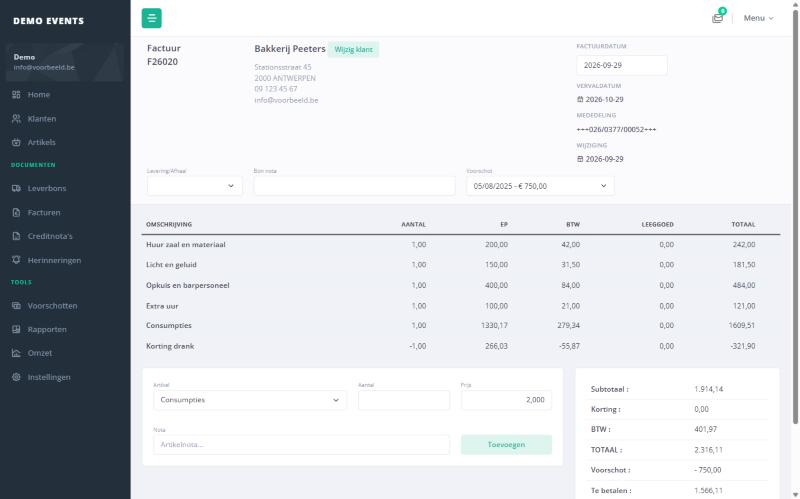
One click on the delivery note and the invoice is ready, with due date, structured payment reference, QR code and any advances deducted.
Paid
Record the payment or send a reminder. Stratie keeps track of the open balance and reminder level of every invoice.
Everything you need, nothing you don't
Don't use quotes or planning? Just switch those modules off and they disappear from the menu.
Correct invoices in seconds
Stratie does the maths: price from the customer's price category, customer discount, VAT per line and returnable packaging in and out. You see the total and the due date straight away.
- Quotes, delivery notes, invoices and credit notes, each with its own numbering
- Due date from the customer's payment term, including "end of month"
- Belgian structured reference (+++123/4567/89012+++) and payment QR code on the PDF
- Send by email with your own standard text and extra attachments
Delivery notes your customer signs on your smartphone
No more paper slips. The driver opens the delivery note on a smartphone, the customer signs on the screen and the note is marked done in Stratie right away.
- Delivery or pickup, with an assigned driver
- The signature is stored with the delivery note
- Overview of what has not been invoiced yet
- Drivers only see delivery notes and the planning
See at a glance who delivers what, and when
Drag open delivery notes onto the calendar. Each entry shows the customer, note number, driver and whether it is a delivery or a pickup.
- Drag-and-drop calendar
- List of delivery notes still to be scheduled
- Start and end date and a comment per entry
- Click through to the lines of the delivery note
Paid sooner, without awkward phone calls
Stratie knows which invoices are overdue and which are ready for the next reminder. Select them and send everything at once.
- Multiple levels, from a friendly reminder to a formal notice
- Adjustable waiting time between two reminders
- Editable texts with due date, amount, payment reference and IBAN filled in
- Exclude an invoice from reminders, with a reason
Our records show that invoice 26-0377 for € 842.10, due on 30/09, is still open. Please pay to BE12 3456 7890 1234 with reference +++026/0377/00052+++.
Advances that land on the invoice by themselves
A customer pays an advance when ordering, sometimes weeks before delivery. Stratie remembers it and deducts it from the right invoice. No notes in the margin and no credit note afterwards.
- Record the advance with the customer, with date, amount and comment
- Pick the advance from a list on the delivery note or invoice
- The PDF shows the advance with its date, and what is still due
- The advance counts towards the open balance and payment status
- A linked advance is locked, so it cannot be changed by accident
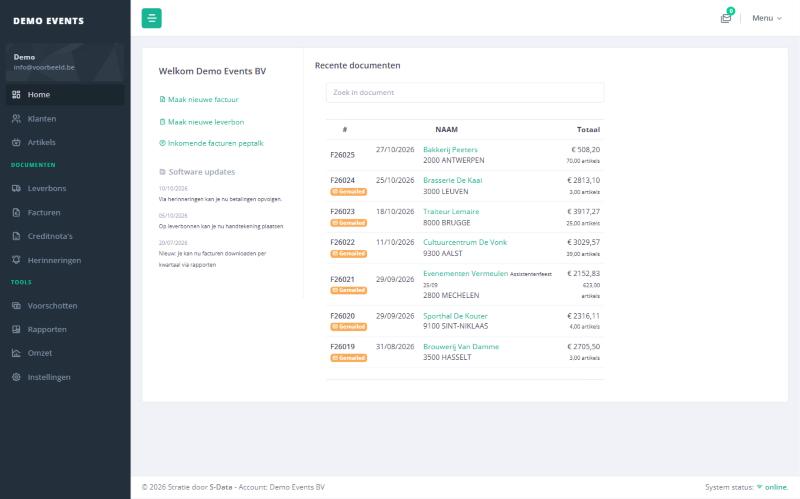
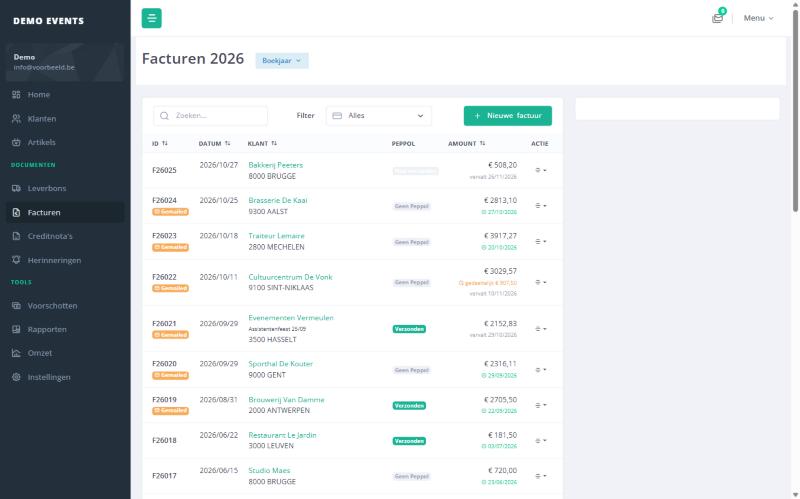
A tour of Stratie
Clear, fast and made for daily use, in the office and on the road. The application itself is in Dutch.
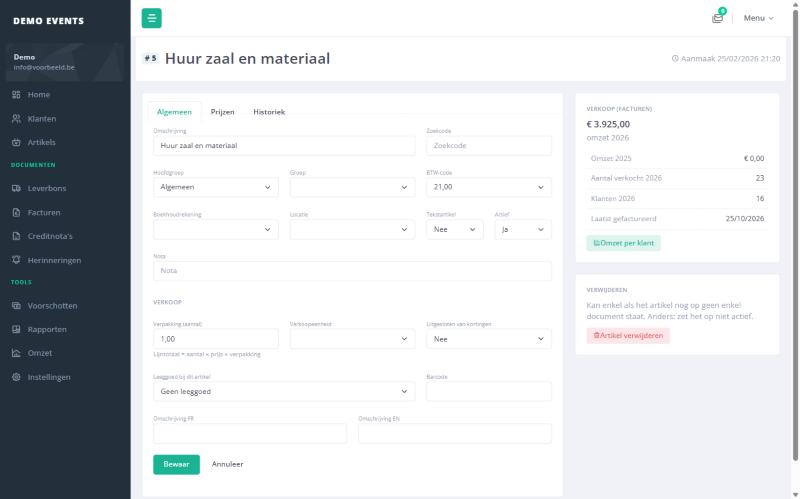
Price categories
Multiple price categories per product. Every customer automatically gets the right price. New prices can start on a set date.
Bulk price changes
Raise all prices, or one group, by a percentage with rounding. You see a preview first.
Advances Unique
An advance paid with the order is kept with the customer and deducted from the right invoice automatically.
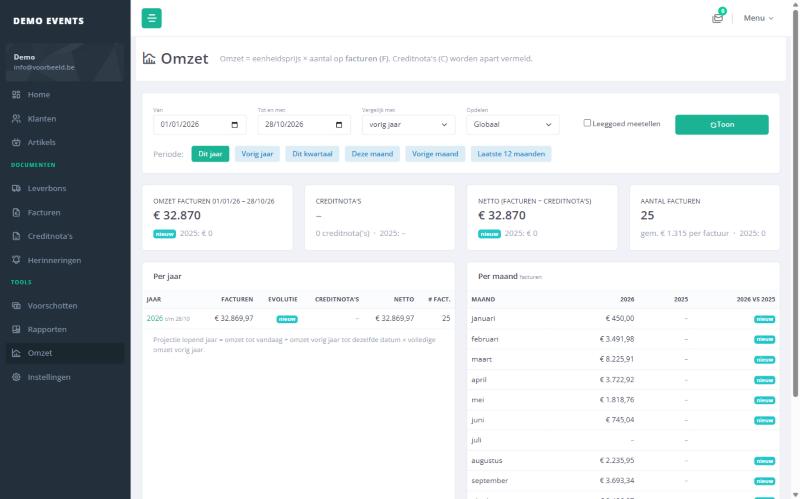
Revenue overview
Per month, customer or article, compared with up to three previous years and with a forecast for this year.
QR code and structured reference
Every invoice carries a structured payment reference and a QR code the customer scans with a banking app.
Email from Stratie
Standard texts per document type, separate email addresses for invoices and delivery notes, and a log of everything sent.
Export for your accountant
Download all invoices of a quarter or year as a ZIP file, ready to pass on.
Multilingual articles
Enter article descriptions in Dutch, French and English, with search code and barcode.
Modules on or off
Quotes, delivery notes, planning, financial follow-up and price categories: use only what you need.
Ready for mandatory e-invoicing
Since 2026, Belgian businesses must invoice each other electronically through Peppol. In Stratie there is nothing extra to do: it is built in through PepTalk, our own Peppol service.
- Invoices and credit notes go out via Peppol automatically when sent
- Only to customers with a valid VAT number, the rest simply get an email
- Status per document: sent, pending or error
- No extra software or connector needed
Everyone sees what they need
Give each user a role. Payments and figures stay with the owner, and drivers only see their own deliveries.
Admin
Full control
Everything staff can do, plus payments, reminders, revenue and reports, users and settings.
Staff
The day-to-day work
Creates quotes, delivery notes and invoices, manages customers and articles, and schedules deliveries.
Driver
On the road, on a smartphone
Sees only delivery notes and the planning, and has the customer sign on delivery.
Good to know
Do I need to install anything?
No. Stratie is a web application: you work in the browser on your computer, tablet or smartphone. Updates happen automatically.
Does Stratie meet the Peppol requirement?
Yes. Stratie sends invoices and credit notes through PepTalk, S-Data's Peppol service, to customers with a valid VAT number. You follow the status of each document in Stratie.
Can my driver get delivery notes signed?
Yes. With the driver role, the delivery note opens on a smartphone, the customer signs on the screen and the signature is stored with the note.
Can I use different prices per customer?
Yes. Each product can have multiple price categories and each customer gets a price category. You can also set a discount per customer and schedule new prices from a given date.
How do payment reminders work?
Stratie calculates the due date from the customer's payment term. Overdue invoices show up on the reminders screen. You send them by email in multiple levels, with the invoice attached. Every reminder is logged.
What does my accountant get?
You download all invoices of a quarter or year as a ZIP file. Customers and articles have fields for the accounting code and ledger account.
Is my data safe?
Every business has its own, separate database. Users log in with their own password and only see what their role allows.
Is the application available in English?
The Stratie interface is currently in Dutch. Article descriptions can be entered in Dutch, French and English. Have a specific question? Get in touch.
Curious how Stratie would work for your business?
We'd be happy to show you in a short demo, using your own examples.
Request a demoLet's talk
Tell us briefly what you do and how you invoice today. We'll get back to you soon.
- Email
info@s-data.be - Website
www.s-data.be