
All Stratie features
From the first quote to the last payment. Here is everything Stratie does.
Four document types, one flow
Each document has its own numbering and list, and moves to the next step in one click.
Quote
Draw up a price proposal and email it as a PDF. Accepted? Confirm it and Stratie turns it into a delivery note.
Delivery note
Delivery or pickup, with driver and planning. The customer signs digitally. Status labels show what has not been invoiced yet.
Invoice
One click from the delivery note. Due date, structured reference, QR code and advances are handled automatically.
Credit note
Create a credit note for a customer. It counts separately, as a negative, in the revenue overview.
A document editor that thinks along
- Article lines with quantity, unit price, VAT rate, packaging and a note per line
- Returnable packaging in and out, such as crates and kegs
- Customer discount and price from the customer's price category
- Internal memo that stays off the document
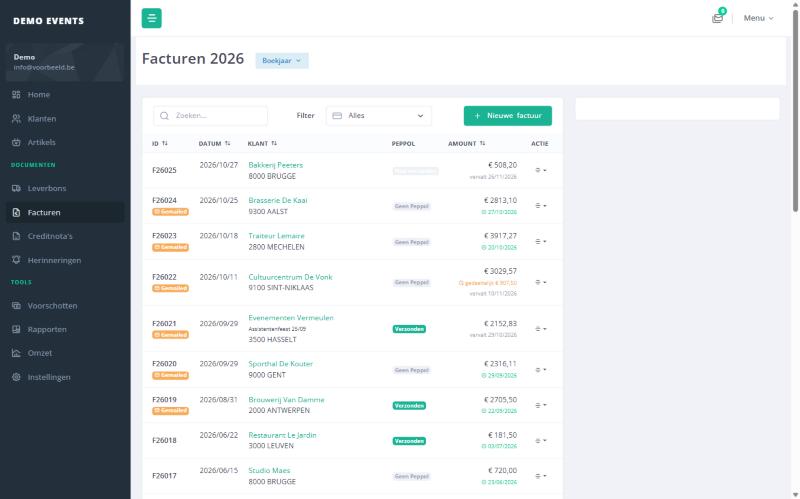
- Lists per year, with search, an open-items filter and "hide completed"
- Status labels: delivered, invoiced, paid, days overdue, Peppol
Your customers and articles, neatly organised
Everything that goes on a document, you enter only once.
Customers
- Address with postcode lookup, VAT number and VAT regime
- Separate email addresses for invoices and for delivery notes
- Payment term, discount and price category per customer
- Accounting code and a fixed note printed on every document
- Set customers inactive without losing their history
Articles
- Description in Dutch, French and English, with search code and barcode
- Groups, VAT code, sales unit, packaging and ledger account
- Multiple price categories, purchase price and new prices from a set date
- Raise prices in bulk by a percentage with rounding, with a preview first
- Sales history: revenue this year and last year, customers and last invoice
Know who still has to pay
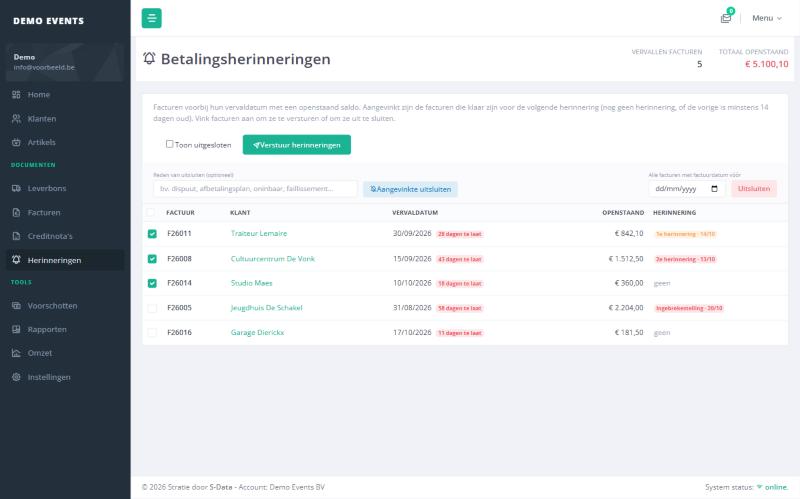
For every invoice, Stratie tracks what is open, when it falls due and which reminder has gone out.
Payment terms and due date
Each customer has a payment term, for example 30 days or 30 days end of month. The due date and structured reference are calculated automatically. You record payments with date, amount and payment method, and the open balance adjusts.
Reminders in multiple levels
Overdue invoices appear on the reminders screen. After an adjustable waiting time they are ready for the next level, from a friendly reminder to a formal notice. You send them by email in one go, with the invoice PDF attached. Invoices can be excluded with a reason.
Advances Unique
Record an advance with date, amount and comment, then pick it on the delivery note or invoice. On the PDF the customer sees the advance with its date and the amount still due. The advance counts towards the open balance.
Every reminder sent is logged with its level, recipient, open amount and user.
Figures you can act on
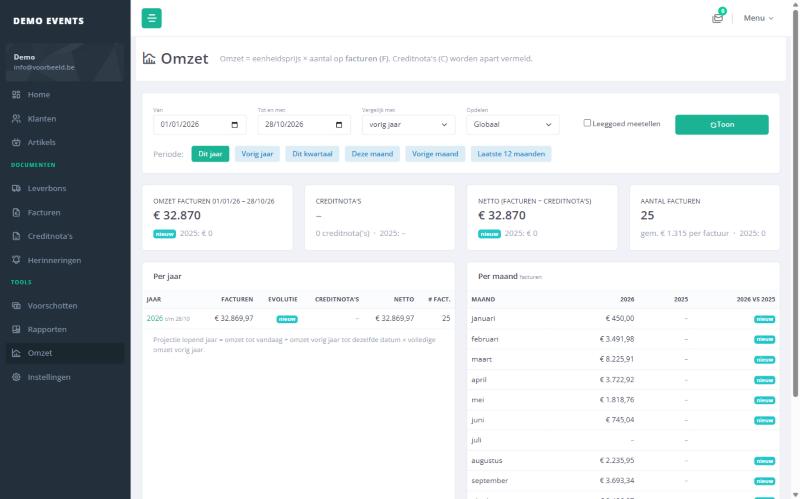
The revenue overview shows how your year is going, compared with previous years.
Per month, customer or article
Compare with up to three previous years, with growth in green or red. Drill down to the detail.
Forecast
Stratie estimates revenue for the full year, measured against the same date last year.
Reports
All invoices of a quarter or year as a ZIP for your accountant, and an overview of orders per driver and per day.
Roles and modules
Decide who sees what, and which parts you use.
| Admin | Staff | Driver | |
|---|---|---|---|
| Quotes, invoices and credit notes | ✔ | ✔ | — |
| Delivery notes and signature | ✔ | ✔ | ✔ |
| Planning | ✔ | ✔ | ✔ |
| Customers and articles | ✔ | ✔ | — |
| Payments and reminders | ✔ | — | — |
| Revenue and reports | ✔ | — | — |
| Users and settings | ✔ | — | — |
Quotes, delivery notes, planning, financial follow-up and price categories are switched on or off in the settings. What is off disappears from the menu. Your data is kept, so switching back on restores everything.